Best for
LinkedIn, CV, and founder photos
Useful for job seekers, founders, creators, freelancers, and anyone who needs a cleaner public-facing profile image.
Professional Profile Photo AI
EditLuma turns casual portraits into cleaner, more credible profile photos for LinkedIn, resumes, founder pages, speaker bios, and creator profiles.
Best when the visitor wants the clearest profile-photo-specific promise and result.
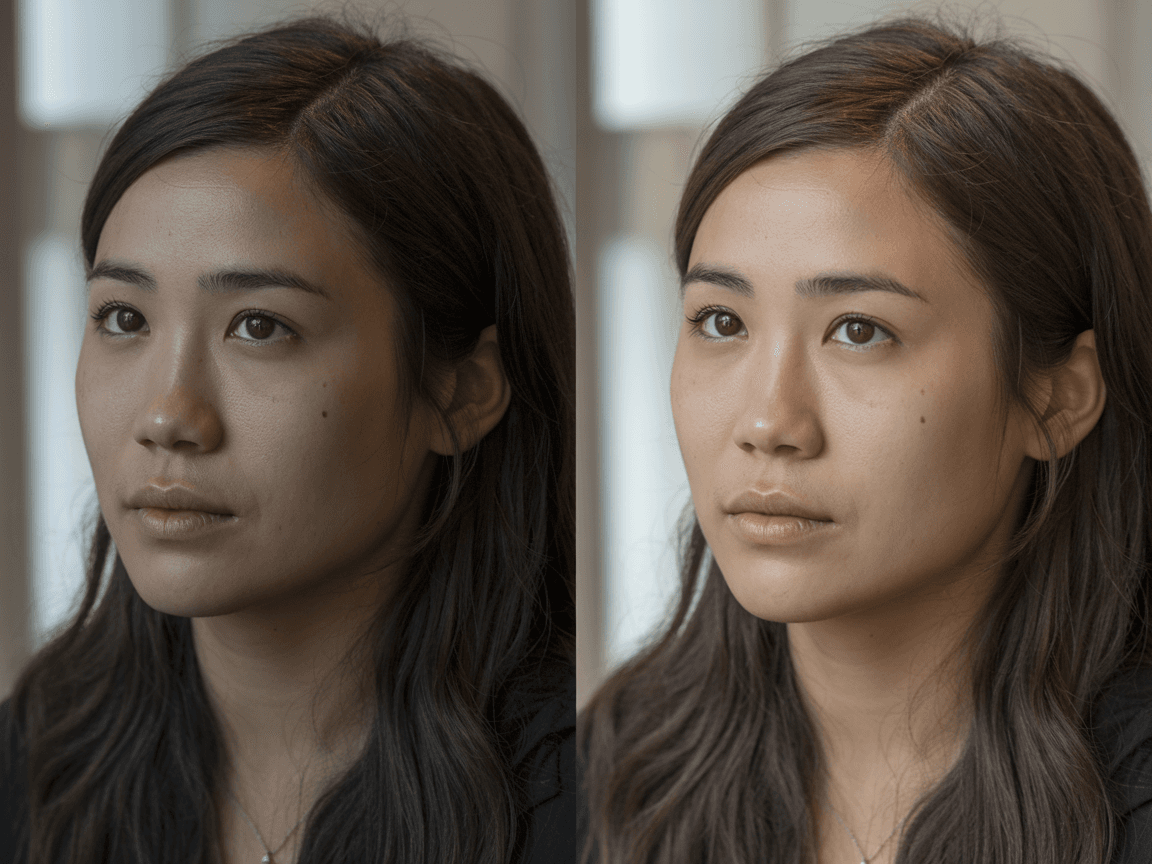
Built for casual photos that need a stronger first impression without looking fake.
Best for
LinkedIn, CV, and founder photos
Useful for job seekers, founders, creators, freelancers, and anyone who needs a cleaner public-facing profile image.
Result style
Business-ready, believable polish
The result should look stronger and more intentional while still feeling like the original person.
Workflow fit
Upload -> preview -> choose final
A focused route for visitors who care about first impression, profile readiness, and public-facing trust.
Why this workflow
Profile-photo visitors care about one thing above all: whether the result looks professional enough to ship without looking fake. This page is built around that decision.
Look professional without a photoshoot
Turn a casual photo into something more credible for job applications, founder intros, and public-facing profiles.
Keep the face believable
Improve lighting, texture, and polish without pushing the face into an obviously overedited result.
Fit multiple public profile surfaces
Use the final image across LinkedIn, resumes, founder pages, team directories, speaker bios, and social profiles.
Compare a few candidate directions quickly
Move faster by reviewing a few profile-photo directions and choosing the one that gives the strongest first impression.
How it works
The goal is not to rebuild a face. It is to make a usable casual photo feel cleaner, more balanced, and ready for the public profile contexts where people judge you quickly.
Upload a casual portrait or selfie
Start with the photo you already have, whether that is a selfie, a casual portrait, or a cropped headshot from a larger frame.
Apply a profile-photo direction
Choose a direction that emphasizes cleaner light, believable skin detail, and a more professional first impression.
Review the most credible final result
Judge the image like a LinkedIn headshot or public bio photo. If a version feels overdone, keep the more natural result.
Use cases
These use cases are all about public-facing photos that represent a real person. The standard is trust, clarity, and a stronger first impression.
Job seekers and career transitions
Upgrade a casual photo before it appears on LinkedIn, resumes, CVs, and application materials.
Founders, operators, and team leads
Use a stronger headshot for founder bios, team pages, personal sites, investor intros, and speaker pages.
Creators and freelancers
Polish profile photos that show up across bios, communities, outreach, and brand-facing touchpoints.
Team and speaker directories
Create a more consistent, professional headshot standard across company and event pages.
FAQ
Visitors usually care about whether this can replace a weak profile photo without making the face look fake. These are the core questions to answer.
Yes. A casual selfie can work as long as the face is readable and the framing is usable. The point of this workflow is to make an ordinary portrait feel more professional.
It should not. The target is believable polish, not a plastic skin result. Review the final options and keep the one that still looks like you.
No. It also fits resumes, CVs, founder pages, team directories, speaker bios, freelance profiles, and creator about pages. LinkedIn is simply the clearest search intent.
Use the photo enhancer when the visitor already has the right image and mainly needs clarity or light repair. Use this page when the goal is the strongest profile-photo-specific positioning and polish.
Related workflows
This is the main profile-photo offer. The related pages below handle photo repair, brand-new draft generation, and the pricing step that usually follows intent.
AI Profile Photo Enhancer
Use this when the visitor already has a photo and mainly needs blur, light, or clarity repair.
Explore page
AI Profile Photo Generator
Use this when the visitor needs a brand-new draft direction before cleanup and final polish.
Explore page
Credit Pricing
Review package options before running several profile-photo candidates, cleanups, or retries.
Explore page
Professional profile photo AI
Start with one casual photo and see whether it can become the professional image you want people to judge you by.
Best when the visitor wants the clearest profile-photo-specific promise and result.